Disclosure: As an Amazon Associate, I earn from qualifying purchases. This site uses localized tracking links.
Choosing the Right Router Architecture for Your Property Size
As a network engineer, I don’t believe in a “one-size-fits-all” solution for home Wi-Fi. The physical footprint, layout, and building materials of your house dictate exactly what type of router architecture you need to deploy to keep your Sonos system stable.
When upgrading away from your restrictive ISP hub, you have two primary options: Standalone Routers or Mesh Wi-Fi Systems. Here is how to choose the right fit for your property size, based on the hardware I have personally used and tested.
Option A: Standalone Routers (Best for Apartments & Small to Medium Houses)
A standalone router uses a single, high-powered physical unit to broadcast a Wi-Fi signal outward from one central location in your home.
- The Advantages: Because all your wireless devices connect back to one single point, there is zero network handoff latency. Your Sonos speakers will never have to struggle with “node-hopping,” which drastically reduces app discovery timeouts. Standalone routers typically offer the highest raw processing speeds and deep enterprise-level configuration panels.
- The Limitation: They are bound by physical distance and walls. If your router lives in the hallway, a Sonos speaker sitting in a far bedroom or kitchen might suffer from signal degradation.
My Personal Recommendation (Asus or TP Link Archer Series Routers): I have spent years using and deploying Asus & TP Link Routers. Their native firmware is incredibly robust and easy to use, giving you direct, granular control over most of the settings you need to change to ensure your Sonos investments run very smoothly.
Asus Wi-Fi Routers: (Check Price on Amazon)
TP Link Wi-Fi Routers: (Check Price on Amazon)
Option B: Mesh Wi-Fi Systems (Best for Large, Multi-Storey, or L-Shaped Houses)
A Mesh network uses one main router connected to your internet line, paired with multiple satellite routers (nodes) placed around the house to form a seamless blanket of Wi-Fi coverage.
- The Advantages: Although more expensive than single routers, mesh networks are the ultimate solution for eliminating Wi-Fi dead zones in larger properties. By placing a node near your garden room, lounge, or kitchen, you guarantee that your stationary Sonos speakers always have a strong, high-bandwidth local wireless signal.
- The Limitation: Mesh networks use automated logic to steer devices between nodes. If unconfigured, this can cause Sonos speakers to constantly jump between nodes, dropping their connection.
The Longevity Play (Wi-Fi 7): If you are buying a new system today, upgrading straight to a Wi-Fi 7 mesh is the single best choice for future-proofing. Wi-Fi 7 introduces a feature called Multi-Link Operation (MLO), which allows nodes to bundle multiple wireless frequency bands together simultaneously. This dramatically cuts down network latency and congestion, making it the most resilient architecture for expanding smart home ecosystems.
My Personal Recommendation (Asus AiMesh or TP-Link Deco Series): For a large home running a complex Sonos layout, I highly recommend and personally use the TP-Link Deco Series Wi-Fi 7 system. TP-Link has optimized their software to handle Sonos multicast packets beautifully, and their companion mobile app makes it incredibly simple to toggle Fast Roaming OFF and assign permanent DHCP Static IP Reservations to your Arc, Sub, and surrounds in seconds. Asus AiMesh routers are also a very solid choice due to their super stable software and award winning hardware.
Asus ZenWiFi Mesh Systems: (Check Price on Amazon)
TP-Link Deco Mesh Systems: (Check Price on Amazon)
The Secret to Mesh Success: Use a Wired Backhaul
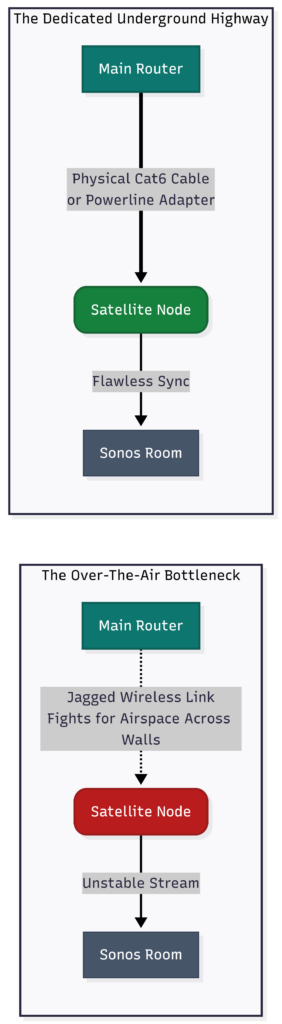
If you choose a mesh system, the golden rule for absolute stability is to connect your nodes using a physical network cable.
- Why it matters: Wireless mesh nodes have to fight for over-the-air bandwidth to talk to each other, creating network latency that causes audio stuttering. A wired backhaul routes data down a lightning fast physical pipe.
- How easy is it? It is completely plug-and-play. Modern systems like the TP-Link Deco require zero manual configuration. You simply run an ethernet cable between the nodes, and the system instantly shifts its traffic lane to the wire.
- The No-Drill Alternative: If you can’t run physical cables through your walls, you can establish a wired backhaul in under two minutes using Powerline Adapters, which securely route your internet data straight through your house’s existing electrical wiring (this is dependant on the existing wiring of your property).
If you already have a mesh system, a question to now ask yourself is, how is your mesh system currently wired up? (wirelessly or wired together)
What’s the optimal router configuration required for your Sonos speakers to work flawlessly? Click here to find out!